Why Did We Build Route Receipts?
Why Did We Build Route Receipts?
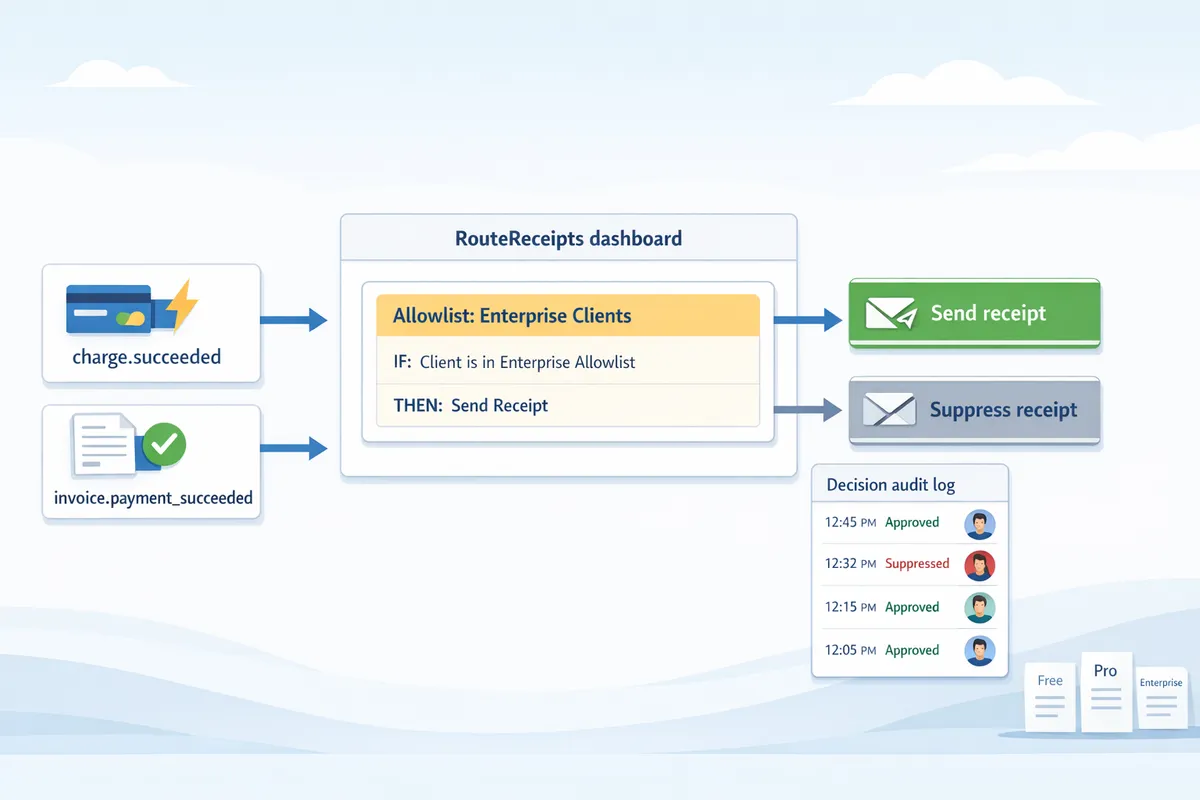
Routing every Stripe receipt to all customers produces inbox clutter and wastes finance time for teams that manage hundreds of transactions monthly. Route Receipts gives Stripe teams a dashboard-native flow to selectively send receipts and maintain allowlists without custom webhooks. This article explains the product rationale, technical playbook, and implementation templates for Route Receipts so Stripe teams can selectively route receipts and manage allowlists. We show how a decision audit log, simple allowlist UX, and marketplace setup reduce engineering overhead while keeping auditability. For background on broader Stripe receipt management and SaaS integrations, see our guide to receipt management for Stripe. Which design trade-offs made selective routing fast, auditable, and easy to operate?
Why we built Route Receipts and the problems it solves
Route Receipts addresses a practical limitation in Stripe: the platform forces teams to send receipts to every customer or none. Our website built this app to let finance and product teams selectively send Stripe receipts to the people who need them while suppressing noise for everyone else. The result maps directly to measurable operational outcomes—fewer unnecessary emails, lower support volume, and clearer audit trails for expense workflows.
Common customer scenarios and requirements 🧾
Enterprise clients needing receipts for expense reports. Example: a 400-seat enterprise requires receipts routed only to AP and the employee listed on the expense form; everything else should be suppressed. Expected outcome: fewer forwarded emails and faster expense reconciliation.
Marketplaces with mixed buyer profiles. Example: a two-sided marketplace sells to both consumers and B2B buyers; consumer purchases should not generate receipts to vendors, while B2B vendor purchases must go to vendor finance contacts. Expected outcome: reduced email noise for consumers and consistent receipt delivery for vendor accounting.
Subscription SaaS where partners require receipts. Example: a SaaS reseller needs partner invoices routed to partner billing contacts, not to end users. Expected outcome: clearer partner reporting and fewer support tickets asking "who should I forward this to?"
Each scenario maps to operational metrics teams track: total receipt emails sent, percent of receipts routed to billing contacts, and volume of support tickets about misrouted receipts. Our website built Route Receipts so teams can control those metrics without code.
Operational pain points and compliance risks 📧
Blanket receipt sending creates three predictable operational problems. First, inbox clutter increases unsubscribe friction when consumers receive documents they never asked for. Second, accounting teams face manual forwarding and duplicated records when receipts land with the wrong contact. Third, audits break down because there is no reliable decision provenance for why a receipt was or was not sent.
Bookkeeping impact manifests as: manual entry into AP systems, duplicate charge records when both customer and finance teams save receipts, and lost audit trails when forwards replace original delivery paths. To make auditability actionable, capture these fields for every routing decision:
- customer_id (Stripe customer identifier)
- charge_id or invoice_id
- decision_reason (e.g., allowlist match, partner rule, suppressed)
- timestamp (UTC)
Recording those fields in a decision audit log preserves traceability for auditors and reduces time spent reconciling expense reports.
How an allowlist solves selective routing ✅
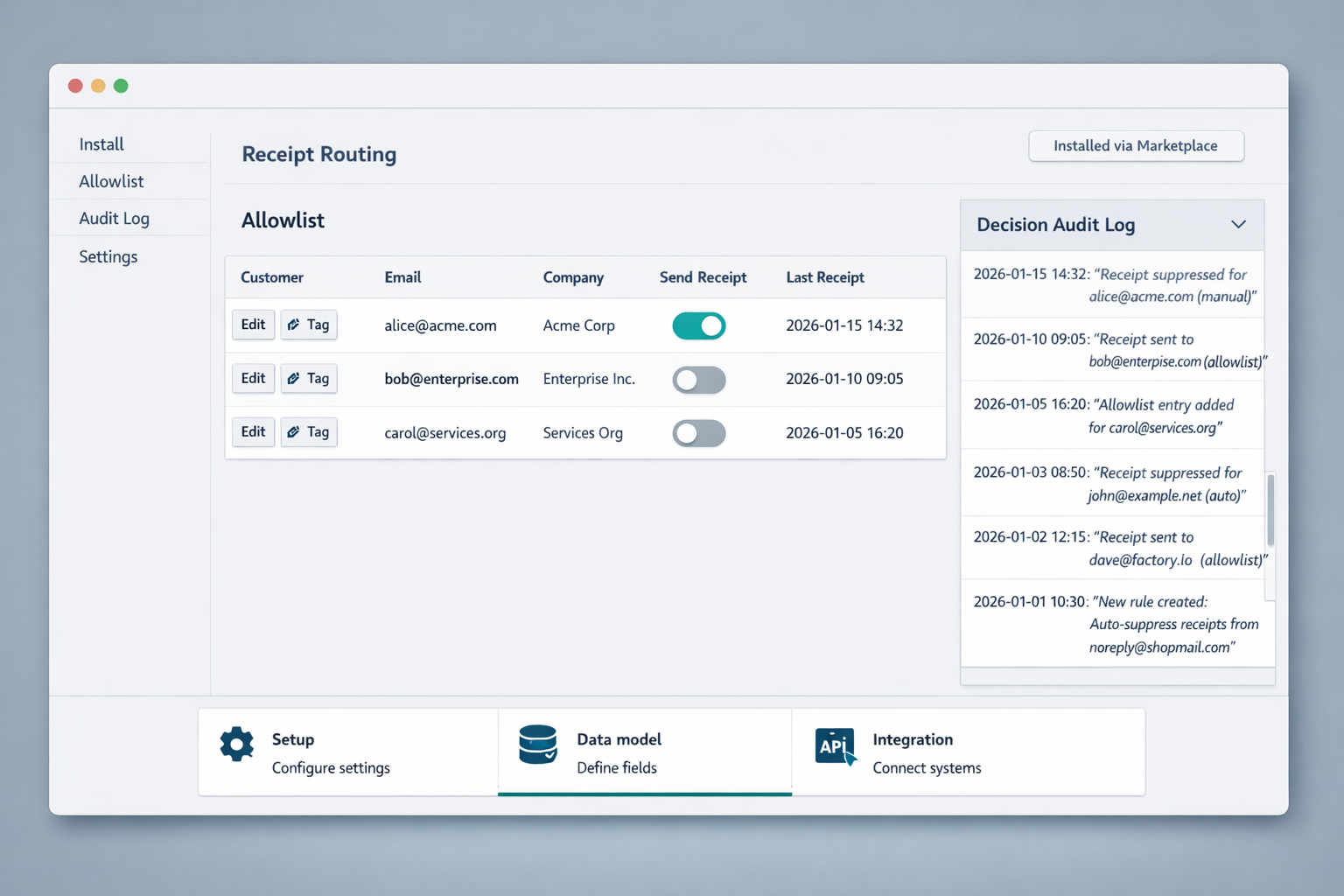
The allowlist model marks specific customers or billing contacts as eligible to receive receipts; only allowlisted entries trigger email delivery. Our website implements allowlist membership as a boolean attribute tied to a customer record and to billing-contact metadata, so teams can selectively send receipts without writing webhooks or custom code.
Admin controls live in the dashboard and include: bulk CSV import for allowlist entries, per-customer toggles, and filters for receipt types (charges, refunds, invoices). Decision audit logs record who added or removed a customer from the allowlist and why, providing the provenance needed for compliance reviews.
A simple setup workflow used by finance teams:
- Export billing contacts from your billing system.
- Map billing contact to customer_id in the CSV.
- Upload to the Route Receipts dashboard and set receipt types for each row.
- Review decision logs after a pilot week and adjust rules.
💡 Tip: Maintain an allowlist column for billing contact and expense recipient to reduce misrouted receipts.
For teams that must selectively send Stripe receipts, the allowlist model reduces noise, preserves audit trails, and fits enterprise receipt management for expenses without engineering work.
Implementation playbook: setup, data model, and integration patterns
This playbook gives a repeatable, step-by-step route for teams that want to selectively send Stripe receipts using Route Receipts. It covers the Stripe Marketplace install flow, the canonical data model for allowlists, and two integration patterns with their trade-offs. Follow the numbered checklist and the test actions to verify routing behavior before you flip on live traffic.
Step-by-step setup via the Stripe Marketplace 1–5 🔧
- Install Route Receipts from the Stripe Marketplace.
- Test action: Complete installation using a Stripe test account. Expected result: Route Receipts appears in your Stripe connected apps list and shows an installation timestamp.
- Grant read/write receipt permissions.
- Test action: Confirm the OAuth scopes include receipt read and receipt write (or equivalent). Expected result: the app shows permission confirmation and you can view a sample receipt record inside the dashboard.
- Configure allowlist fields.
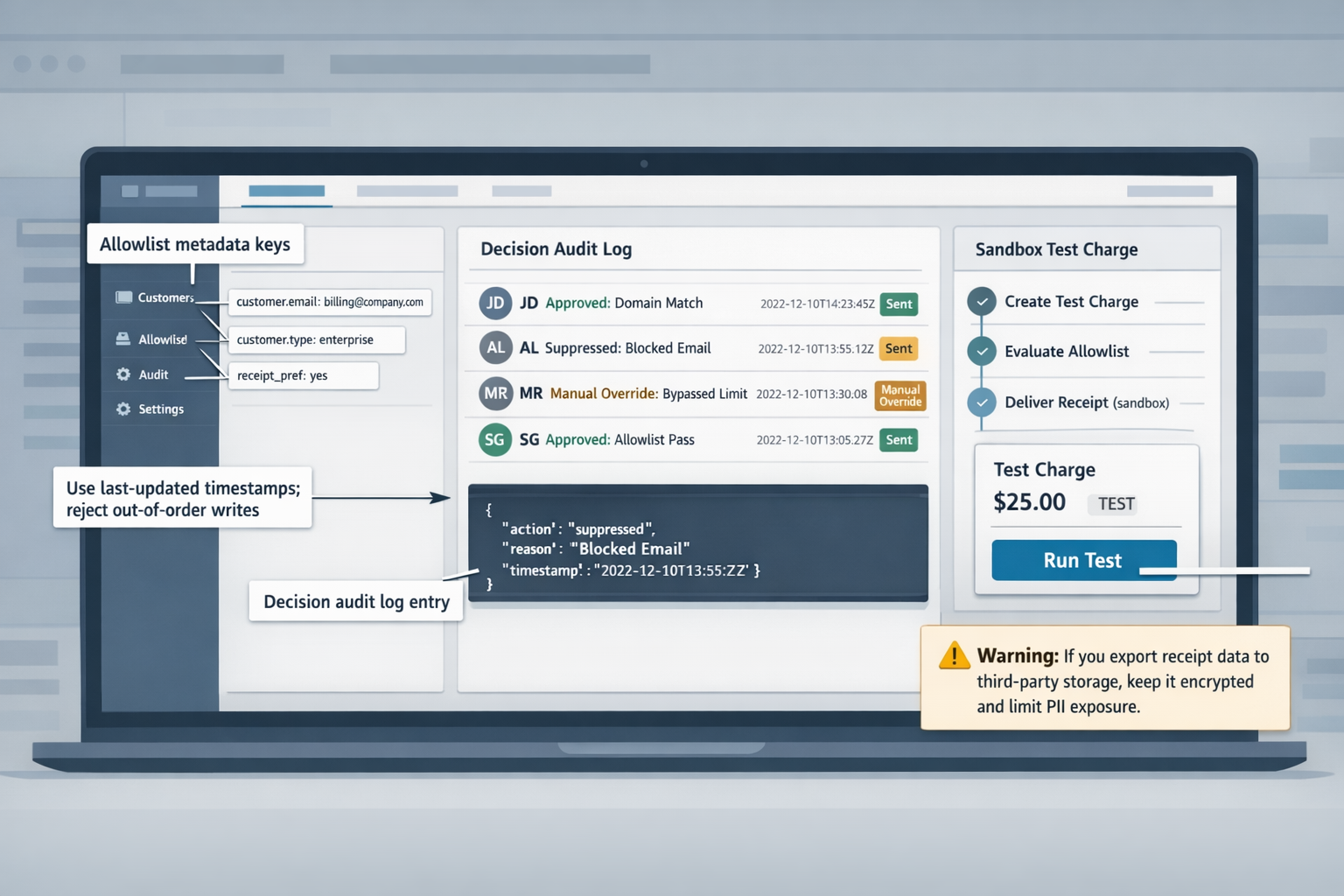
- Test action: In the Route Receipts Stripe dashboard integration, add a metadata key such as receipt_allowlist and a default deny policy. Expected result: new customers created with metadata.receipt_allowlist=true route receipts to billing contacts.
- Enable decision audit logging.
- Test action: Toggle audit logging and run a sandbox charge. Expected result: the decision log records the routing decision, the actor, and the metadata snapshot.
- Test with sandbox charges.
- Test action: Create three sandbox charges: one for an allowlisted customer, one for a denied customer, and one for a customer with missing metadata. Expected results: allowlisted charge triggers an email (or webhook action), denied charge produces no external receipt, missing metadata follows the default policy and writes a notice to the audit log.
Each step requires verification in sandbox before moving to production. Our website recommends performing these checks under a separate Stripe test account and preserving logs for at least one week.
Data model and mapping for allowlists 🗂️
Required fields for every allowlist record: Stripe customer ID, billing contact email, allowlist flag, reason code, and last-updated timestamp. Map these directly into Stripe customer.metadata and into your CRM or subscription table to maintain parity. For example, store metadata.receipt_allowlist=true on the Stripe Customer object and map Salesforce.Receipt_OptIn__c to that metadata key through your middleware. Use a canonical source of truth to avoid sync conflicts: pick one writable system (CRM, internal DB, or Route Receipts dashboard) and make others read-only.
Recommended mapping patterns:
- Primary mapping: Stripe customer.id -> customers.customer_id. Keep billing_contact_email in both Stripe customer.email and customers.billing_email for fast joins.
- Allowlist flag: metadata.receipt_allowlist (boolean) and subscriptions.receipt_group (string) when group-level control is needed.
- Reason code: metadata.receipt_reason (values such as expense_policy, enterprise_request, test).
Sync strategy and conflict avoidance:
- Single-writer pattern: choose one system as the writable source and emit webhook updates to other systems.
- Reconciliation job: run a daily job that compares last-updated timestamps and writes a reconciliation report. For example, reconcile when last-updated differs by more than 5 minutes to catch race conditions.
This data model supports teams that need to manage an allowlist of customers in Stripe and ensures you can selectively send Stripe receipts with predictable behavior.
Integration patterns: dashboard-native vs webhook flows 🔁
Dashboard-native approach. Our website provides a dashboard-native interface for admin-managed allowlists so non-engineering teams can change routing without code. Implementation detail: admins edit metadata keys or group tags inside the Route Receipts Stripe dashboard integration and changes take effect immediately for new payment events. Trade-offs: fastest for business users, highest manual control, and simpler auditability because every change is recorded in the decision log.
Webhook-driven approach. A webhook flow gives programmatic control for automated rules, such as mapping allowlist membership from an ERP or order-management system. Implementation detail: listen for Stripe events (charge.succeeded or invoice.payment_succeeded) and call Route Receipts' evaluation API before sending receipts. Example payload mapping: payload.customer = stripe_event.data.object.customer; payload.metadata = stripe_event.data.object.metadata; route_decision = POST /api/evaluate with that payload.
Trade-offs between approaches:
- Speed of changes: dashboard is immediate for admins; webhooks require deployment cycles but support bulk automated updates.
- Auditability: dashboard stores human-edited audit trails in the decision log; webhook flows must separately persist incoming events and decisions to match audit requirements.
- Control and scale: webhooks handle complex business logic such as tiered allowlists and cross-account rules; dashboard is better for small teams and one-off exceptions.
Common pitfalls and mitigations:
- Pitfall: Metadata drift between systems. Mitigation: enforce single-writer and run hourly reconciliation jobs.
- Pitfall: Missing receipt permissions. Mitigation: verify OAuth scopes during install and confirm read/write access in sandbox.
- Pitfall: Race conditions on subscription updates. Mitigation: use last-updated timestamps and reject out-of-order writes.
⚠️ Warning: If you export receipt data to third-party storage, ensure you keep it encrypted and limit PII exposure.
Templates and code examples for common routing workflows
These templates and snippets accelerate implementation for teams using Route Receipts. Use the dashboard patterns, webhook examples, and audit schemas below to build a repeatable allowlist-driven receipt flow that fits enterprise receipt management for expenses.
Dashboard UI patterns and admin workflows 🛠️
Design the admin screen so finance staff can search customers, toggle allowlist membership, bulk upload CSVs, and inspect audit-log entries from a single panel. Our website's Route Receipts Stripe dashboard integration uses a three-column layout: left column for filters (customer ID, email, metadata tags), middle for results with inline allowlist toggles, and right column for selected-customer details and recent audit entries.
Important UI elements and actions.
- Search box with autocomplete by email, customer.id, or company name.
- Inline toggle for allowlist membership with confirmation modal and reason field.
- Bulk upload CSV that shows a preview diff and dry-run validation step.
- Audit log viewer with quick-filter by action and date range.
CSV column template (header row).
- customer_id,email,action,timestamp,actor,reason
Sample CSV row.
- cus_ABC123xyz,finance@client.com,add,2026-02-01T12:00:00Z,jane.doe@ourdomain.com,Need receipts for expenses
Validation rules to prevent bad updates.
- customer_id: required, regex ^cus_[A-Za-z0-9_-]{8,}$.
- email: required if adding; must pass RFC 5322 basic check.
- action: must be one of add, remove.
- timestamp: optional; if present must be ISO 8601.
- Reject rows that would create duplicate adds within the same batch.
- Upload CSV. 2. Run dry-run validations and display errors inline. 3. Show preview diff of changes grouped by actor. 4. Require typed confirmation to commit.
💡 Tip: Always include a dry-run preview and audit reason when committing bulk allowlist changes to reduce rollback work.
Webhook payload and decision logic examples 🧩
Inspect these payload fields to decide whether to send a receipt: customer.id, charge.id, receipt_required, invoice.paid, metadata.allow_receipt, and customer.email. Route Receipts expects the Stripe webhook body plus any metadata your billing flow writes to charges or invoices.
Example minimal webhook fields to read.
- id: evt_123
- type: charge.succeeded
- data.object.customer: cus_ABC123xyz
- data.object.id: ch_1A2B3C
- data.object.metadata.allow_receipt: true
- data.object.receipt_required: false
Pseudocode decision flow.
- If receipt_required is true, send receipt immediately.
- Else if metadata.allow_receipt is explicitly true, send.
- Else if customer.id is in allowlist, send.
- Else suppress and log automated decision with reason.
Fallback behavior when allowlist source is unreachable.
- Use a local cached allowlist with TTL of 5 minutes. If cache miss and the charge metadata indicates enterprise=true, send the receipt to avoid missing expense records. Otherwise suppress and create a manual review item in the audit log.
Node.js example (Express) demonstrating decision logic.
// Minimal example. Replace fetchAllowlist and sendReceipt with real functions.
app.post('/webhook', express.json, async (req, res) => {
 const evt = req.body;
 const obj = evt.data.object;
 const customerId = obj.customer;
 const receiptRequired = !!obj.receipt_required;
 const metaAllow = obj.metadata && obj.metadata.allow_receipt === 'true';

 if (receiptRequired) { await sendReceipt(obj); return res.sendStatus(200); }

 try {
 const allowlist = await fetchAllowlist(customerId); // may throw if unreachable
 if (metaAllow || allowlist.includes(customerId)) {
 await sendReceipt(obj);
 await writeAudit({ action: 'auto_send', actor: 'system', target_customer_id: customerId, charge_id: obj.id });
 } else {
 await writeAudit({ action: 'suppress', actor: 'system', reason: 'not_in_allowlist', target_customer_id: customerId, charge_id: obj.id });
 }
 } catch (err) {
 const cached = getCachedAllowlist(customerId);
 if (cached === true || obj.metadata.enterprise === 'true') { await sendReceipt(obj); }
 else { await writeAudit({ action: 'suppress', actor: 'system', reason: 'allowlist_unreachable', target_customer_id: customerId, charge_id: obj.id }); }
 }

 res.sendStatus(200);
});
Python example (Flask) showing the same flow.
from flask import Flask, request
app = Flask(__name__)

@app.route('/webhook', methods=['POST'])
def webhook:
 evt = request.json
 obj = evt['data']['object']
 customer_id = obj.get('customer')
 if obj.get('receipt_required'):
  send_receipt(obj)
  return '', 200

 meta_allow = obj.get('metadata', {}).get('allow_receipt') == 'true'
 try:
  allowlist = fetch_allowlist(customer_id)
  if meta_allow or customer_id in allowlist:
   send_receipt(obj)
   write_audit(...)
  else:
   write_audit(...)
 except Exception:
  if cached_allowlist_contains(customer_id) or obj.get('metadata', {}).get('enterprise') == 'true':
   send_receipt(obj)
  else:
   write_audit(...)
  return '', 200
⚠️ Warning: Do not rely solely on live allowlist queries for high-volume production traffic; always maintain a short-lived local cache to avoid missed receipts during transient failures.
Audit log schema and sample entries 📑
Keep the audit log compact and queryable: event_id, action, actor, reason, target_customer_id, charge_id, timestamp, source, and diff. Store the diff field as a JSON object that shows before/after values for allowlist membership.
Schema (types).
- event_id: string (uuid)
- action: string (add, remove, auto_send, suppress)
- actor: string (email or system)
- reason: string
- target_customer_id: string
- charge_id: string (nullable)
- timestamp: ISO 8601 string
- source: string (ui, csv, webhook)
- diff: object
Three sample entries.
- Allowlist add via UI.
{ "event_id": "evt-001", "action": "add", "actor": "jane.doe@ourdomain.com", "reason": "enterprise expense policy", "target_customer_id": "cus_ABC123xyz", "charge_id": null, "timestamp": "2026-02-01T12:00:00Z", "source": "ui", "diff": {"before": {"allowlisted": false}, "after": {"allowlisted": true}} }
- Allowlist removal via CSV.
{ "event_id": "evt-002", "action": "remove", "actor": "bulk-upload@ourdomain.com", "reason": "contract ended", "target_customer_id": "cus_DEF456ghi", "charge_id": null, "timestamp": "2026-02-02T09:15:00Z", "source": "csv", "diff": {"before": {"allowlisted": true}, "after": {"allowlisted": false}} }
- Automated decision to suppress a receipt.
{ "event_id": "evt-003", "action": "suppress", "actor": "system", "reason": "not_in_allowlist", "target_customer_id": "cus_GHI789jkl", "charge_id": "ch_1A2B3C", "timestamp": "2026-02-03T14:45:00Z", "source": "webhook", "diff": {"decision": "suppressed"} }
Frequently Asked Questions
Route Receipts answers operational and technical questions teams raise while evaluating selective receipt delivery for Stripe. The answers below focus on concrete setup steps, admin controls, and common implementation patterns you can apply immediately. Each question gives a direct answer first, then actionable details and examples.
How does Route Receipts let me selectively send Stripe receipts? 📨
Route Receipts uses an allowlist decision: if a customer record is on the allowlist the Stripe receipt is sent; if not, the receipt is suppressed. Our app intercepts the Stripe receipt event, evaluates the allowlist rule for the associated customer_id, and issues a send or a suppress decision recorded in the audit log. Admins can create allowlist entries by customer_id, email, or metadata tag, and apply rules such as "all invoices for vendor X" or "send only for billed contacts with expense_approval=true." The decision log stores timestamp, acting admin, evaluated rule, and outgoing recipient address for traceability and dispute resolution. Example: for a large vendor account you map billing_contact_email -> allowlist entry so expense receipts always deliver to the vendor AP inbox while retail customers remain suppressed.
Can I manage an allowlist of customers in Stripe without code? 🛠️
Yes. Our dashboard-native workflow supports single edits, bulk CSV uploads, and role-based admin controls so non-developers can maintain the allowlist. From the dashboard you search by customer_id or email, toggle allowlist status, and add metadata notes; for bulk changes upload a CSV with columns customer_id,email,reason and our parser validates matching Stripe customer_ids before applying changes. Admin roles restrict who can change allowlist entries and who can export the decision audit log. For example, finance can update billing contacts while support can only view entries.
💡 Tip: Use the CSV template from our dashboard and include a last_updated_by column so your team keeps a clear audit trail for bulk operations.
Does Route Receipts integrate directly into the Stripe dashboard? 🔗
Yes. Our app installs through the Stripe Marketplace and appears inside the Stripe dashboard once granted the required permissions. During install the admin grants read access to customer and invoice objects and webhook management so our app can receive invoice.payment_succeeded or charge.succeeded events and apply the allowlist decision in real time. For configuration you need a Stripe admin role that can approve Marketplace integrations; post-install, role-based permissions inside our dashboard control who can change routing policies and export logs. Example install flow: Stripe admin approves Marketplace app, grants customer.read and webhook.create, then an ops user completes allowlist onboarding via our dashboard.
How do I handle enterprise receipt management for expenses? 🧾
Create a predictable mapping between billing entities and expense contacts, standardize receipt content, and retain detailed audit logs for reconciliation. Practically, map Stripe customer metadata fields (billing_company, billing_contact_email, department_code) to your expense system; set allowlist rules to route receipts to the mapped billing_contact_email and include a standardized receipt footer with purchase order or cost center. Keep receipts in a single searchable audit store with decision metadata (who routed, rule hit, timestamp) to support finance reconciliations and internal audits. Example workflow: export daily routed receipts to your expense system CSV with columns invoice_id, amount, billing_contact, department_code so AP can match receipts to payments without manual lookups.
What are common troubleshooting steps when receipts are not delivered? 🔍
First, confirm whether the receipt was suppressed by an allowlist decision or attempted to send and failed; check the decision audit log for the evaluated rule and outcome. Next, verify Stripe webhook or event delivery: confirm the invoice event reached our webhook endpoint and that Stripe returned a 2xx response; review webhook retries in Stripe if not. Then validate recipient email formatting and MX checks; incorrect recipient addresses or recipient-side spam filters commonly block delivery. Finally, inspect JavaScript or API integration points if you manage allowlist entries programmatically: ensure customer_id used in rules matches the live Stripe customer_id and that metadata keys are consistent. Example step sequence: audit log -> Stripe webhook logs -> recipient validation -> rule configuration check.
Is customer privacy and compliance covered when routing receipts? 🔐
Yes. Our controls minimize exported PII, log every routing decision for access tracking, and require role-based permissions for exports and edits. We store only the PII necessary to route a receipt (recipient email and customer_id) and offer data-retention settings so teams can purge persisted copies after a configurable window. Audit logs include who viewed or changed allowlist entries and what rule executed so you can demonstrate access controls during audits. For persisted receipt copies or exports, encrypt stored files and encrypted transport when sending to downstream systems. Example policy: restrict CSV exports to finance admins, redact customer phone numbers in exports, and enforce retention of decision logs for the legally required period.
How Route Receipts helps Stripe teams
Our website built Route Receipts to give Stripe teams a clear technical playbook and implementation templates so they can selectively route receipts and manage an allowlist of customers in Stripe. The core takeaway is practical: reduce unnecessary receipt noise while keeping auditable, dashboard-native controls for customers who require receipts for expenses.
RouteReceipts is a specialized application designed to enhance the way businesses manage their Stripe receipt distribution. This app addresses a significant limitation within Stripe's native functionality, which traditionally forces businesses to either send receipts to all customers or none at all. RouteReceipts empowers businesses with the flexibility to selectively send receipts to specific customers, thereby preventing unnecessary email clutter for those who do not require them. By integrating directly into the Stripe dashboard, RouteReceipts allows users to manage an allowlist of customers effortlessly, without the need for complex coding or custom webhook integrations. The application features a dashboard-native user interface, a decision audit log for transparency, and a straightforward setup process via the Stripe Marketplace. RouteReceipts offers a tiered pricing model, starting with a free plan that includes 20 receipts per month, with the option to upgrade for higher volume needs.
Subscribe to our newsletter.